
localhost:

Logs

Each Service’s output, the merged view, filtering and what is kept.

Select a Service to see its output, with colours. All services shows every Service of the Project in one stream, each line prefixed with its Key. ⌘F filters, ⌃L (Ctrl+L) clears the view; log files are kept. URLs in the output are clickable.
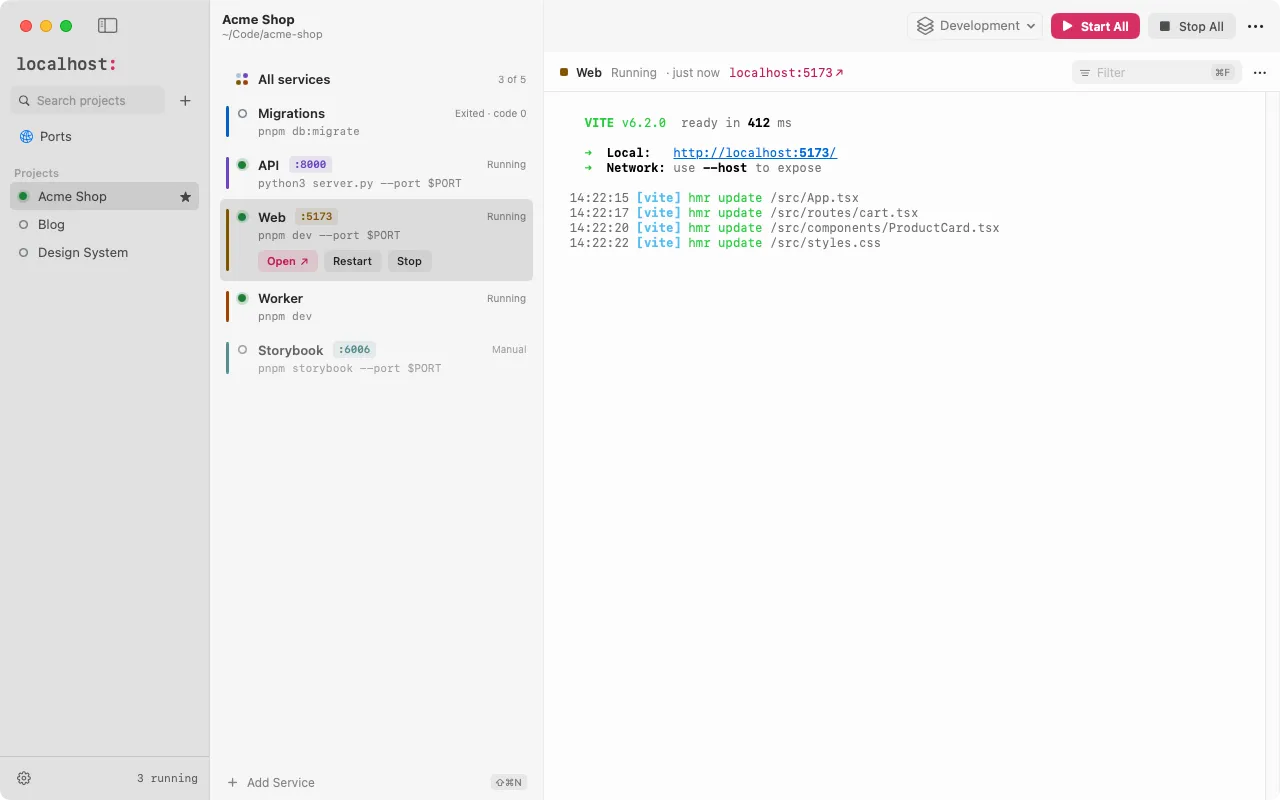
One Service selected in light mode: Web is Running on port 5173, with Open, Restart and Stop buttons and its Vite output

Output goes through pipes, not a terminal, so localhost sets FORCE_COLOR=1, CLICOLOR_FORCE=1 and PYTHONUNBUFFERED=1 for every Service: tools keep their colours and don’t hold output back.

What is kept

Each Run keeps its latest 10,000 lines in memory for the window, and writes everything to a log file. The last 5 Runs of each Service are kept on disk, up to 10 MB each. See Data and storage for where.

Edit this page on GitHub

Install localhost for macOS

Two quick steps, usually under a minute.

  1. Drag it to Applications

    Open localhost-0.1.0.dmg and drag localhost to Applications.

    Download localhost-0.1.0.dmg
  2. Open it the first time

    localhost isn’t notarized by Apple yet, so macOS blocks the first launch once:

    1. Click Done in the warning.
    2. Open System Settings › Privacy & Security and scroll to Security.
    3. Click Open Anyway, and confirm with your password or Touch ID.

    Or run this in Terminal, then open localhost:

    xattr -dr com.apple.quarantine /Applications/localhost.app

macOS 15 or later · Apple silicon or Intel

  1. Run the installer

    Open localhost_0.1.0_x64-setup.exe. It installs for your user only, no administrator rights needed.

    Download localhost_0.1.0_x64-setup.exe
  2. Get past SmartScreen

    The installer isn’t signed by a known publisher yet, so Windows says “Windows protected your PC”:

    1. Click More info.
    2. Check that the file is localhost_0.1.0_x64-setup.exe.
    3. Click Run anyway.

Windows 10 or 11 · x64 · WSL 2 for Projects in WSL

  1. Download your package

  2. Install it

    From the folder you downloaded it to:

    sudo apt install ./localhost-app_0.1.0_amd64.deb
    sudo dnf install ./localhost-app-0.1.0-1.x86_64.rpm
    chmod +x localhost-app_0.1.0_amd64.AppImage && ./localhost-app_0.1.0_amd64.AppImage

    Secrets need a Secret Service (GNOME Keyring, KWallet). On stock GNOME the tray icon needs the AppIndicator extension.

x86_64 · Ubuntu 22.04+ · Debian 12+ · Fedora

On another system?Install guide →